We will be updating this page periodically as questions come to us. Please, let us know if we can help you!
If your question isn't answered in this section please review the Administrator FAQ's to see if your question is addressed there. If you still need assistance, please contact info@publicartist.org.
What can I do with PublicArtist.org?
Artists who are members of PublicArtist.org can use our tools to help streamline the process of applying for RFQs and RFPs. All members have access to the Image Library and Documents sections where they can store their information for use in applications that are submitted on our site. Premium members can use this information to make applications for opportunties that require e-mail and postal mail submissions; they also have access to Folios. We send out email alerts for new calls to all of our members, so you can spend less time looking, and more time applying. Visit the User Profile to review your preferences for Call Notifications.
I keep getting an E2 error when I try to log in. What does this mean?
Most often, an E2 error signals that either an incorrect email address or password has been entered. If you keep getting this error, please request that your password be emailed to you. (You can do this by clicking on "Forgot Password" under the Sign In area on the home page.) If you are still having trouble logging in, please send us an email and we will be happy to assist you.
How do I change my password?
You can change your password using the link shown on the My Profile page. It is located just beneath your email address.
What is the Image Library?
The Image Library is where you will upload images and the corresponding information for your past work; we handle all of the image resizing requirements for each application. So, upload once and you're done! Organize your images by project or piece, not by what you're applying to. Have more than one image for a project? No problem, since the nature of public art generally requires more than one image to capture a commission, we've set up the library to ask for the details of a commission just once, no more manual re-entry for multiple images!
I've completed a basic application, and I'd like to reuse some of those images and information for a new application. Is there a way to do that?
Yes, you can import images and documents from previous applications to use in the future. To do this, please navigate to the Image Library, and click on Import Application. It's the last option in the navigation menu.
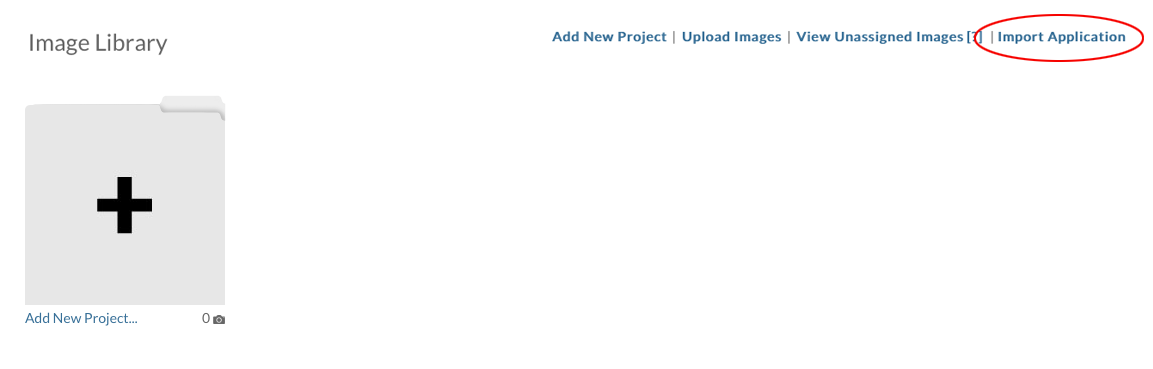
Now, you will see a screen with a dropdown menu, that has a list of all of the basic applications you have completed. Select the application you'd like to import and then click on the blue "Import Application" button. That's it! Now you'll see these projects in your Image Library, and the relevant documents will appear in the Documents section.
I've imported images from an application into my Image Library, and now I need to group some of the images together. How do I do that?
When you import information from a previous application, each image will go into its own project. Sometimes, if you have details or alternate views of a commission, you'll want to keep those images together. In order to do this, follow the instructions below:
1. Select the Project which contains the image you want to move.
2. On the Project Details page, there is a list of all of the images that belong to that project. Click the "Edit" button next to the image that you'd like to move.
3. Under the image, on the right hand side, there is a dropdown menu labelled "Project". Select the name of the project that you'd like to move the image to.
4. Click "Submit" at the bottom of the screen. (If the image that you have moved was the only image from its project, you may delete the project.)
Can I add videos to my Image Library?
Yes! You can upload videos into any project. (We suggest that uploaded videos be under 20MB.)
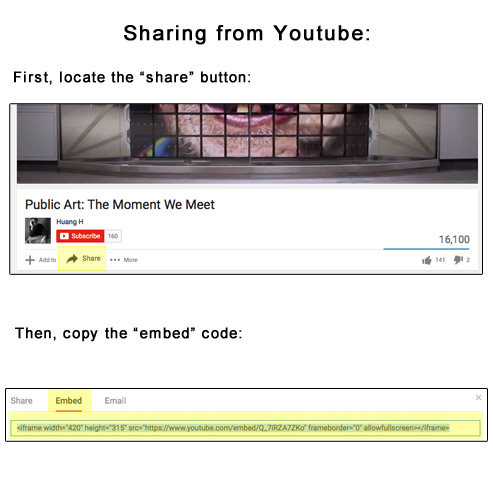
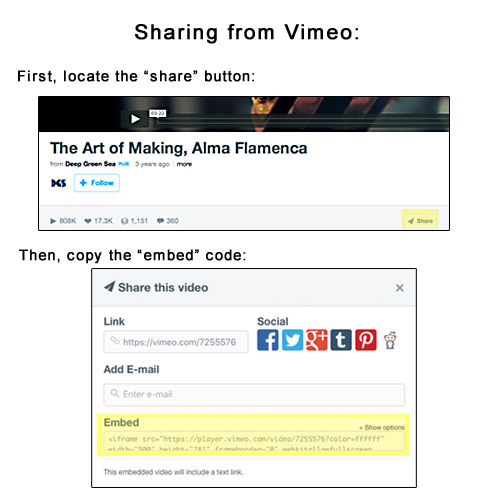
We've also added functionality to allow for embedded videos. Simply locate the "share" function on your video sharing website of choice, and copy the designated "embed" code. (See our handy screenshots below.) Once you paste the embed code on PublicArtist.org, your video will be available to judges, administrators, and curators.
I've uploaded some images but I don't know how to add them to my application. Where are they?
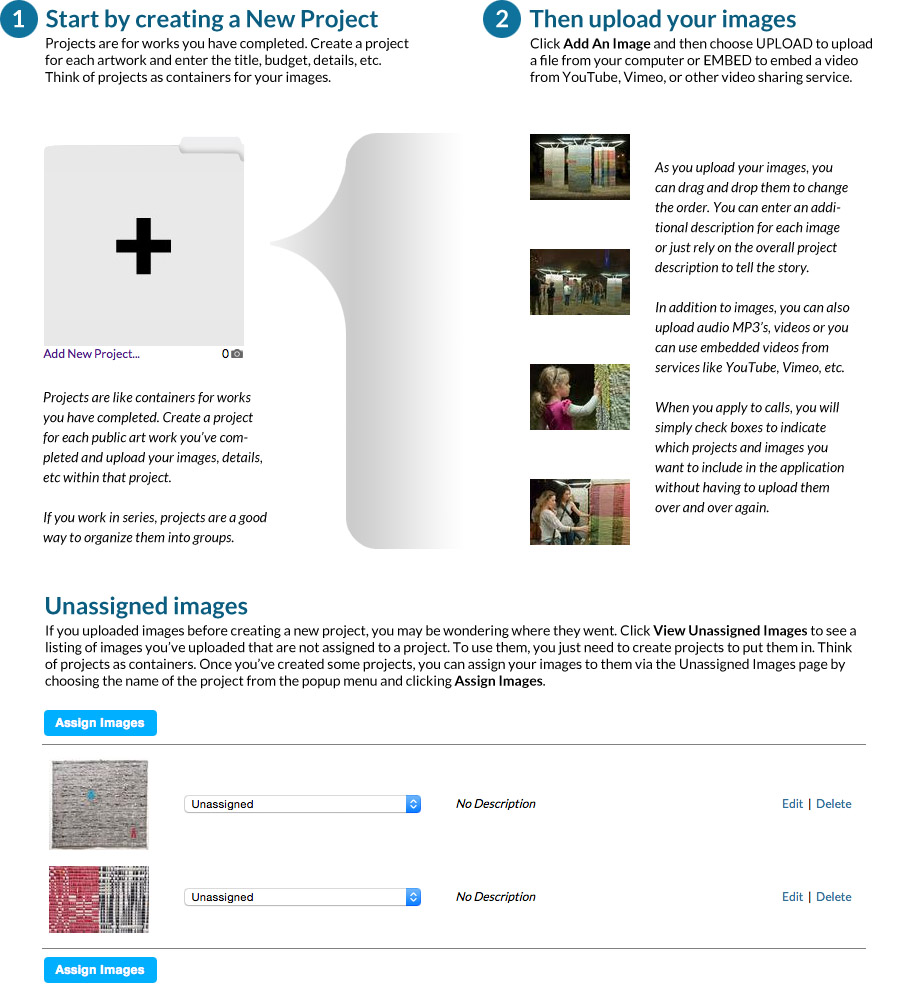
If you clicked on Image Library and then Upload Images to add your images to your account, the images will be Unassigned. This means that they haven't been added to a project yet. Images must be assigned to a project before they are available to use in an application. Please click on "Add New Project" and fill out the information about the artwork. Click Save Changes. Now that your project has been added, you can assign images to it. In order to do this, please click on View Unassigned Images. Here you will see a list of all of your images which aren't assigned to a project. Next to each image, you will see a drop down menu which lists all of the projects in your Image Library. Select the project you want to assign the image(s) to and when you're finished click Assign Images.
My application is full of old artwork that I don't want to use. How do I update it?
In order for you to be able select artwork samples in your application, we have to show you all of the available projects and images that are in your Image Library. When you are in the application, you will notice that to start out, all of the projects are highlighted in grey, and if you click on their names, none of the checkboxes below the thumbnails are checked. That means that no artwork samples have been selected to include in your application.
In order to add new artwork samples, you will need to add them to your Image Library first. To do this, please navigate to the Image Library section of the site. Once there, click on the first folder with a "+" mark on it to add the new artwork. You will be asked to complete the relevant information for the artwork you will be adding. Please save this information when you are finished. Once you have saved that information, you will see options for uploading/adding the media that should be associated with the information you just entered.
Please repeat this process until you have finished adding the necessary items for your application.
When you navigate back to your application, you will see that your new projects and images will appear for you to choose from. When you choose an artwork to include (by clicking the box below the thumbnail image), you will notice that the project becomes highlighted in green, and the count in the upper, right corner of the Artwork Samples section will change accordingly.
What is the Resume Builder?
Resume Builder is a line-by-line method of resume entry. It may seem tedious at first, but once the information is in, Resume Builder helps you quickly format a resume based on a call's requirements. Some arts administrators want a short, one-page resume, others allow for two or even three pages, still others want to see it all. With Resume Builder, after just a few mouse clicks and your resume will be ready for output; no more word processing headaches!
What is the Letter of Interest Composer?
The Letter of Interest Composer is a segment-based input method for writing you letter of interest. Generally speaking, your various letters of interest will have a lot of content in common with each other. With the LOI Composer you can input default paragraphs or sentences to have on hand when writing your letter of interest for a call. You simply choose what default text segments you'd like to add to your letter, and then you can edit your letter to include call-specific text before submission.
What is a Folio?
Please review the Folios section below.
How do I format my images for PublicArtist.org?
Please upload image files that are at least 2000 pixels in the longest dimension. You are able to upload images that are smaller than this, however, we can't guarantee good image quality unless the image meets this minimum size specification. Images which are larger than 2000 pixels in the longest dimension will be down-sampled to 2000 pixels in the longest dimension.
I keep replacing my PDF file, but the site is still showing me the old one. How do I get the site to take the new file?
This is most likely due to your browser cacheing the original file. If you have uploaded a new file, you'll need to force your browser to look on the server for the new file. In order to force your browser to fetch the new file, try this:
- Right-click (or control+click) on the PDF file's link.
- You should get a menu that will allow you to "Open Link in a New Tab" or "Open Link in a New Window". Select either one of these options.
- This will load your PDF, and will mot likely show the old file.
- Now, refresh the browser while you're viewing the file. That should tell the browser to "look again" and retrieve the new version for you.
How do I make my documents into PDFs?
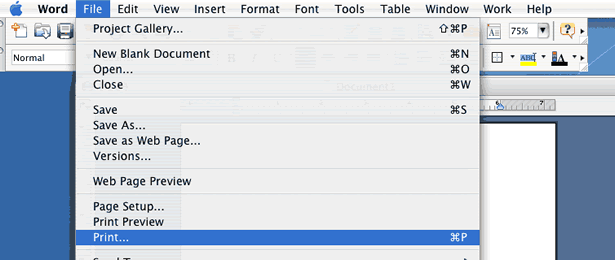
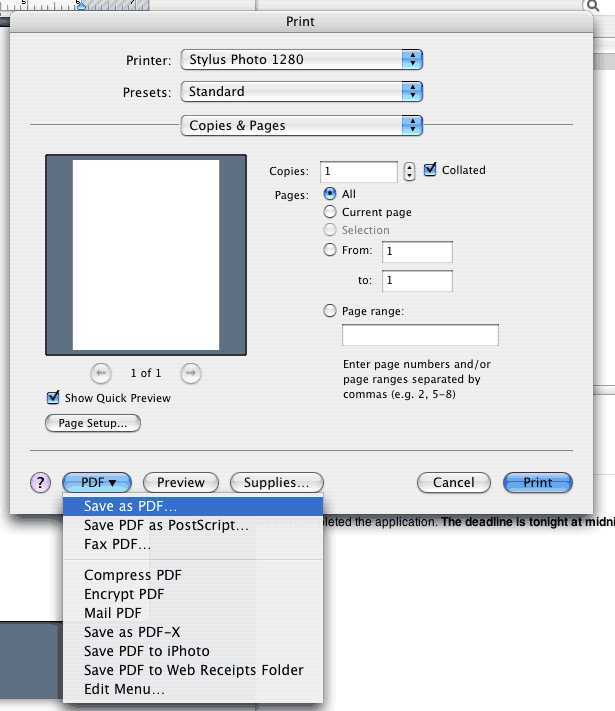
In most places on the website, we will accept .DOC files where we ask for PDFs. If you need to convert your Word document to PDF, open the document in Word. Select "Print" from the "File" Menu. In the bottom left-hand corner, there is a button labeled "PDF", click this button and select the first option "Save as PDF". See illustrations below.
STEP 1:
STEP 2:
Or you can use one of the following free websites/programs to convert your Word and text documents to PDF:
Please save the file to your computer, and then return to our site to upload your PDF.
How do I find calls to apply for?
Once you've logged in, select "Open Calls" from the menu on the upper right. Here, you will see a list of calls that are accepting submissions. You can sort this list by the Name of the call, the Type of call (RFQ or RFP), the Budget amount, the Open date, or the Close date. Click on the name of the call to read the details. If you have set your preferences to recieve Call Notifications in your User Profile, we will email you when a new call is posted.
Once I find a call, how do I apply?
At the bottom of the call details page, click on the "apply" button. This will open the application and you can begin selecting your information for inclusion in your submission. You can save your application at any time and come back to it later, by accessing "My Applications" from the menu at the top-right of the window. Once the application is complete, you will need to submit it from the "My Applications" page.
If you are a Premium member, you will be able to create applications for calls that require submissions via e-mail or postal mail. If "Download & Submit" is the only option given, then you are responsible for downloading your application, following the submission instructions which will be given to you, and mailing your application to the designated address.
How do team applications work?
Team applications work in a variety of ways. If your team is always comprised of the same people, and you share the same body of work, we suggest having a single account for the team, and listing your members in your User Profile. Applications will be completed just as a single artist application.
If you intend to apply for a call with a team member who has a separate body of work, choose one person to be the main applicant. This person will start their application, and at the top of the application screen they will click on the link in this sentence: "If you would like to collaborate with another PublicArtist.org member and need information and images from their profile, please click here to invite them to your team." All artists invited to the application will receive an inviation to apply. Once each member completes their application, the team leader will have access to their materials and attach them to the final application.
What is a Folio?
A Folio is a packet of information used for purposes outside of PublicArtist.org. This feature is available to Premium members of PublicArtist.org.
Why do I need Folios?
We understand that there may be opportunities not hosted on PublicArtist.org that you'd like to apply for. If you're a Premium member of PublicArtist.org you can make custom packets of your information to use any way you like. Just select which documents and images you'd like to include, give us the parameters for sizing your images and we'll take care of the rest. You will be able to download a .zip file that includes all of your documents and images.
My question isn't answered here, is there someone I can talk to?
Yes! Please send us an email and we'll be happy to assist you! Also, check out our videos page for additional pointers!
Where can I find additional information about how to apply for calls?
If you'd like to review our suggestions and other information before applying for calls, or if you're just curious, you can check out our Index to Tips and Teasers page. Also, check out our videos page for additional pointers!
What is your Premium Membership Cancellation Policy?
You can cancel your membership by logging into your Paypal account and canceling the auto-payment profile that is associated with your PublicArtist.org account. Once your Premium Membership is cancelled, your account will be converted to a Basic Membership. This means you can still receive call notifications and apply to any call with a "P" listed under the "Submit Via*" column on the Open Calls page.
What can I do with PublicArtist.org?
Arts administrators and curators can use PublicArtist.org to create RFQ's and RFP's for public art projects. Administrators and curators with Premium memberships can browse our artist members. We also offer Premium Call Postings, which allow you to use the tools at PublicArtist.org to accept applications for your calls. If your organization is interested in building an artist roster, a Premium membership will allow you to have an open call for that opportunity.
How do I get started?
From the home page, select "Post Opportunities" and then click on "Sign Up". You'll be taken to a page to fill in your contact information for your user profile. Once that's done you can get started making calls, creating a roster, and browsing artists!
What information needs to be in my RFQ/RFP?
We have created an easy to fill out form that prompts you for all of the information that artists need to submit a quality application. On the "Create a Call" page, when you see a [?] you can click on it to open a pop-up window with some explanation about what kind of information is needed. If you'd like to review our suggestions and information before creating your call, or if you're just curious, you can check out our Index to Tips and Teasers page.
What do I tell applicants about formatting their images?
We recommend that artists upload images that are at least 2000 pixels in the longest dimension. Our system will handle image resizing for the call. Artists are able to upload images that are smaller than this, however, we can't guarantee the image quality unless the image meets this minimum size specification. Images which are larger than 2000 pixels in the longest dimension will be down-sampled to 2000 pixels in the longest dimension.
What are my options for posting my call at PublicArtist.org?
Currently, there are four judging options when creating a call: Online, Offline (download), and Offline (e-mail or postal mail), and Offsite.
Online Judging: PublicArtist.org has developed a robust online judging system that allows you to have panelists log in and remotely review applications and score entries.
Offline (download): You may choose to download all of the applications which are submitted and print or distribute them however you choose.
Offline (e-mail or postal mail): You may also select the option to have the artist prepare the material for you in some way and have them mail it to you.
Offsite: You may post calls that are hosted on other sites such as CAFE, Slideroom, etc. Listing your call with us will let our artist members know about the opportunity.
Can I browse your artist members?
At this time, arts administrators and curators with Premium accounts are capable of browsing the artists who are members of PublicArtist.org. Once you are on an artist's information page you can find contact information for the selected artist.
My question isn't answered here, is there someone I can talk to?
Yes! Please send us an email and we'll be happy to assist you!
If your question isn't answered in this section pleast review the Artist FAQ's to see if your question is addressed there. If you still need assistance, please contact info@publicartist.org.
 |
 |
 |
 |